

Brain-Boosting Memory Match Game with JavaScript
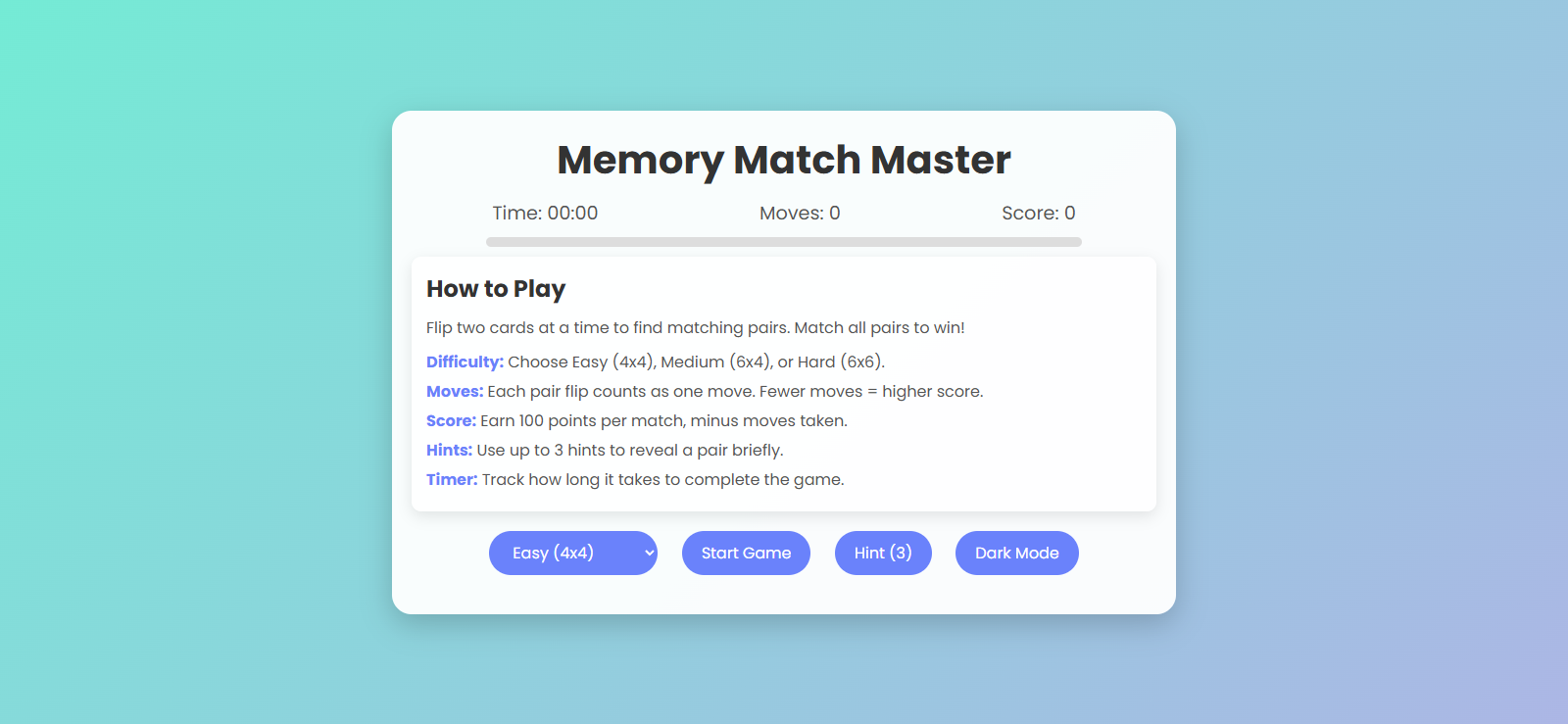
Have you ever wanted to create a fun, interactive game that challenges your memory while improving your front-end development skills? Today, I'll walk you through creating a beautiful memory card matching game that features card flipping animations, score tracking, difficulty levels, and even a dark mode! 🎮
Check out the live demo here - https://playground.learncomputer.in/memory-card-game/
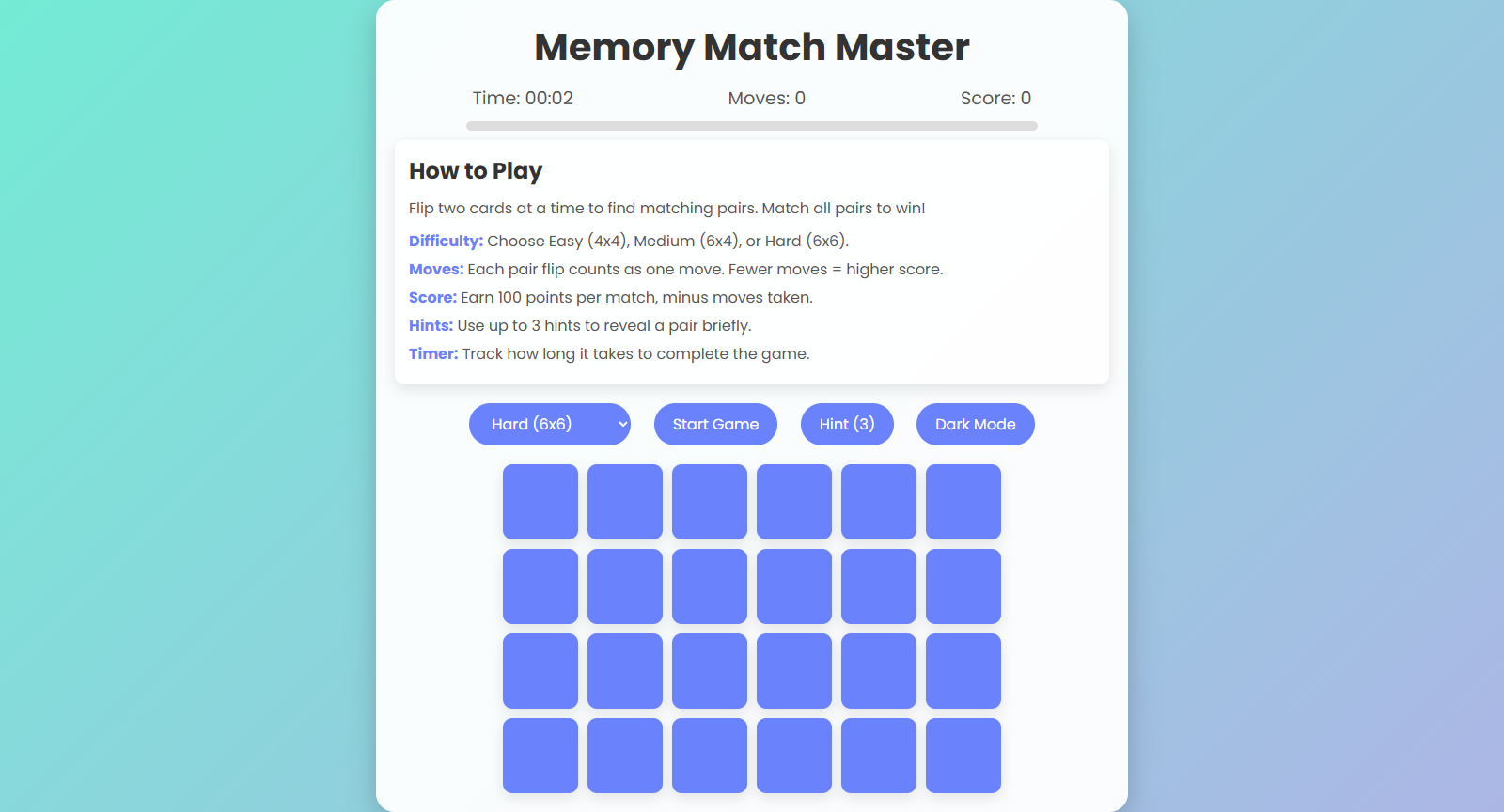
What We're Building
We'll create "Memory Match Master" - a classic card-matching game where players flip cards to find matching pairs. The game includes:
Three difficulty levels (Easy, Medium, Hard)
Timer to track gameplay duration ⏱️
Move counter and scoring system
Progress bar to visualize completion
Hint system for those tricky matches
Dark/Light theme toggle
Responsive design that works on various devices
The final result is not just functional but visually appealing with smooth animations and a modern interface. Let's dive into how it all works!
Project Structure
Our game consists of three main files:
HTML file for structure
CSS file for styling and animations
JavaScript file for game logic
Let's Start with HTML
The HTML provides the structure for our game. We need a container for the game board, controls for game settings, and displays for the game stats.
<!DOCTYPE html>
<html lang="en">
<head>
    <meta charset="UTF-8">
    <meta name="viewport" content="width=device-width, initial-scale=1.0">
    <title>Memory Match Master</title>
    <link rel="stylesheet" href="styles.css">
    <link href="https://fonts.googleapis.com/css2?family=Poppins:wght@400;600;700&display=swap" rel="stylesheet">
</head>
<body>
    <div class="game-container">
        <header>
            <h1>Memory Match Master</h1>
            <div class="stats">
                <span>Time: <span id="timer">00:00</span></span>
                <span>Moves: <span id="moves">0</span></span>
                <span>Score: <span id="score">0</span></span>
            </div>
            <div class="progress-container">
                <div id="progress-bar" class="progress-bar"></div>
            </div>
        </header>
        <div class="how-to-play">
            <h2>How to Play</h2>
            <p>Flip two cards at a time to find matching pairs. Match all pairs to win!</p>
            <ul>
                <li><strong>Difficulty:</strong> Choose Easy (4x4), Medium (6x4), or Hard (6x6).</li>
                <li><strong>Moves:</strong> Each pair flip counts as one move. Fewer moves = higher score.</li>
                <li><strong>Score:</strong> Earn 100 points per match, minus moves taken.</li>
                <li><strong>Hints:</strong> Use up to 3 hints to reveal a pair briefly.</li>
                <li><strong>Timer:</strong> Track how long it takes to complete the game.</li>
            </ul>
        </div>
        <div class="controls">
            <select id="difficulty">
                <option value="easy">Easy (4x4)</option>
                <option value="medium">Medium (6x4)</option>
                <option value="hard">Hard (6x6)</option>
            </select>
            <button id="start-btn">Start Game</button>
            <button id="hint-btn">Hint (3)</button>
            <button id="theme-toggle">Dark Mode</button>
        </div>
        <div id="game-board" class="game-board"></div>
        <div id="modal" class="modal">
            <div class="modal-content">
                <h2>Game Over!</h2>
                <p>Your Score: <span id="final-score"></span></p>
                <button id="restart-btn">Play Again</button>
            </div>
        </div>
    </div>
    <script src="script.js"></script>
</body>
</html>
Our HTML structure includes:
A main container with the game title
Stats section showing time, moves, and score
Progress bar to visualize game completion
Instructions section explaining game rules
Controls for difficulty selection, starting the game, using hints, and toggling theme
Game board container where cards will be generated
Game over modal that appears when the player completes all matches
Styling with CSS
Now let's add style to our structure to make it visually appealing. We'll use CSS to create card flipping animations, theme transitions, and responsive layouts.
* {
    margin: 0;
    padding: 0;
    box-sizing: border-box;
    font-family: 'Poppins', sans-serif;
}

body {
    background: linear-gradient(135deg, #74ebd5, #acb6e5);
    min-height: 100vh;
    display: flex;
    justify-content: center;
    align-items: center;
    transition: background 0.5s;
}

body.dark {
    background: linear-gradient(135deg, #1f1c2c, #928dab);
}

.game-container {
    background: rgba(255, 255, 255, 0.95);
    padding: 20px;
    border-radius: 20px;
    box-shadow: 0 10px 30px rgba(0, 0, 0, 0.2);
    width: 90%;
    max-width: 800px;
    text-align: center;
}

body.dark .game-container {
    background: rgba(40, 40, 40, 0.95);
    color: #fff;
}

header h1 {
    font-size: 2.5em;
    color: #333;
    margin-bottom: 10px;
}

body.dark header h1 {
    color: #fff;
}

.stats {
    display: flex;
    justify-content: space-around;
    margin-bottom: 10px;
    font-size: 1.2em;
    color: #555;
}

body.dark .stats {
    color: #ddd;
}

.progress-container {
    width: 80%;
    height: 10px;
    background: #ddd;
    border-radius: 5px;
    margin: 10px auto;
    overflow: hidden;
}

body.dark .progress-container {
    background: #555;
}

.progress-bar {
    height: 100%;
    width: 0;
    background: #6a82fb;
    border-radius: 5px;
    transition: width 0.3s ease-in-out;
}

body.dark .progress-bar {
    background: #fc5c7d;
}

.how-to-play {
    margin-bottom: 20px;
    text-align: left;
    padding: 15px;
    background: rgba(255, 255, 255, 0.8);
    border-radius: 10px;
    box-shadow: 0 5px 15px rgba(0, 0, 0, 0.1);
}

body.dark .how-to-play {
    background: rgba(60, 60, 60, 0.8);
}

.how-to-play h2 {
    font-size: 1.5em;
    color: #333;
    margin-bottom: 10px;
}

body.dark .how-to-play h2 {
    color: #fff;
}

.how-to-play p {
    font-size: 1em;
    color: #555;
    margin-bottom: 10px;
}

body.dark .how-to-play p {
    color: #ddd;
}

.how-to-play ul {
    list-style: none;
    color: #555;
}

body.dark .how-to-play ul {
    color: #ddd;
}

.how-to-play li {
    margin: 5px 0;
}

.how-to-play strong {
    color: #6a82fb;
}

body.dark .how-to-play strong {
    color: #fc5c7d;
}

.controls {
    margin-bottom: 20px;
}

select, button {
    padding: 10px 20px;
    margin: 0 10px;
    border: none;
    border-radius: 25px;
    background: #6a82fb;
    color: white;
    font-size: 1em;
    cursor: pointer;
    transition: transform 0.2s, background 0.3s;
}

select:hover, button:hover {
    transform: scale(1.05);
    background: #fc5c7d;
}

.game-board {
    display: grid;
    gap: 10px;
    justify-content: center;
}

.card {
    width: 80px;
    height: 80px;
    background: #fff;
    border-radius: 10px;
    box-shadow: 0 5px 15px rgba(0, 0, 0, 0.1);
    position: relative;
    transform-style: preserve-3d;
    transition: transform 0.5s;
    cursor: pointer;
}

body.dark .card {
    background: #444;
}

.card.flipped {
    transform: rotateY(180deg);
}

.card.matched {
    animation: pulse 0.5s ease-in-out;
}

@keyframes pulse {
    0% { transform: rotateY(180deg) scale(1); }
    50% { transform: rotateY(180deg) scale(1.1); }
    100% { transform: rotateY(180deg) scale(1); }
}

.card-front, .card-back {
    position: absolute;
    width: 100%;
    height: 100%;
    backface-visibility: hidden;
    display: flex;
    align-items: center;
    justify-content: center;
    font-size: 2em;
    border-radius: 10px;
}

.card-front {
    background: #fc5c7d;
    color: white;
    transform: rotateY(180deg);
}

.card-back {
    background: #6a82fb;
}

.modal {
    display: none;
    position: fixed;
    top: 0;
    left: 0;
    width: 100%;
    height: 100%;
    background: rgba(0, 0, 0, 0.7);
    justify-content: center;
    align-items: center;
}

.modal-content {
    background: white;
    padding: 20px;
    border-radius: 10px;
    text-align: center;
}

body.dark .modal-content {
    background: #333;
    color: #fff;
}
Key CSS features include:
Gradient backgrounds that change with theme toggle 🌈
Card flip animations using CSS 3D transforms
Responsive layout with flexbox and grid
Smooth transition effects
Pulsing animation for matched cards
Progress bar animation
Dark/light theme with appropriate color changes
The 3D card flip effect is particularly interesting - we're using transform-style: preserve-3d and backface-visibility: hidden to create that realistic card-flipping feel that mimics physical cards.
Game Logic with JavaScript
Now let's implement our game logic with JavaScript:
const gameBoard = document.getElementById('game-board');
const timerDisplay = document.getElementById('timer');
const movesDisplay = document.getElementById('moves');
const scoreDisplay = document.getElementById('score');
const startBtn = document.getElementById('start-btn');
const hintBtn = document.getElementById('hint-btn');
const themeToggle = document.getElementById('theme-toggle');
const difficultySelect = document.getElementById('difficulty');
const modal = document.getElementById('modal');
const finalScore = document.getElementById('final-score');
const restartBtn = document.getElementById('restart-btn');
const progressBar = document.getElementById('progress-bar');

let cards = [];
let flippedCards = [];
let matchedPairs = 0;
let moves = 0;
let score = 0;
let time = 0;
let timer;
let hintsLeft = 3;
let gridSize;

const emojis = ['🐱', '🐶', '🐻', '🦁', '🐼', '🦊', '🐰', '🐸', '🐷', '🐵', '🦄', '🐙'];

function shuffle(array) {
    for (let i = array.length - 1; i > 0; i--) {
        const j = Math.floor(Math.random() * (i + 1));
        [array[i], array[j]] = [array[j], array[i]];
    }
    return array;
}

function createBoard() {
    gameBoard.innerHTML = '';
    const difficulty = difficultySelect.value;
    gridSize = difficulty === 'easy' ? [4, 4] : difficulty === 'medium' ? [6, 4] : [6, 6];
    const totalCards = gridSize[0] * gridSize[1];
    const pairCount = totalCards / 2;
    const cardValues = shuffle([...emojis.slice(0, pairCount), ...emojis.slice(0, pairCount)]);

    gameBoard.style.gridTemplateColumns = `repeat(${gridSize[1]}, 80px)`;
    cards = cardValues.map((value, index) => {
        const card = document.createElement('div');
        card.classList.add('card');
        card.innerHTML = `
            <div class="card-back"></div>
            <div class="card-front">${value}</div>
        `;
        card.addEventListener('click', () => flipCard(card, value));
        gameBoard.appendChild(card);
        return card;
    });
    updateProgress();
}

function flipCard(card, value) {
    if (flippedCards.length < 2 && !card.classList.contains('flipped') && !card.classList.contains('matched')) {
        card.classList.add('flipped');
        flippedCards.push({ card, value });
        moves++;
        movesDisplay.textContent = moves;

        if (flippedCards.length === 2) {
            checkMatch();
        }
    }
}

function checkMatch() {
    const [card1, card2] = flippedCards;
    if (card1.value === card2.value) {
        card1.card.classList.add('matched');
        card2.card.classList.add('matched');
        matchedPairs++;
        score += 100 - moves;
        scoreDisplay.textContent = score;
        updateProgress();
        if (matchedPairs === (gridSize[0] * gridSize[1]) / 2) {
            endGame();
        }
    } else {
        setTimeout(() => {
            card1.card.classList.remove('flipped');
            card2.card.classList.remove('flipped');
        }, 1000);
    }
    flippedCards = [];
}

function updateProgress() {
    const totalPairs = (gridSize[0] * gridSize[1]) / 2;
    const progress = (matchedPairs / totalPairs) * 100;
    progressBar.style.width = `${progress}%`;
}

function startTimer() {
    clearInterval(timer);
    time = 0;
    timer = setInterval(() => {
        time++;
        const minutes = Math.floor(time / 60).toString().padStart(2, '0');
        const seconds = (time % 60).toString().padStart(2, '0');
        timerDisplay.textContent = `${minutes}:${seconds}`;
    }, 1000);
}

function endGame() {
    clearInterval(timer);
    finalScore.textContent = score;
    modal.style.display = 'flex';
}

function useHint() {
    if (hintsLeft > 0 && flippedCards.length === 0) {
        hintsLeft--;
        hintBtn.textContent = `Hint (${hintsLeft})`;
        const unmatched = cards.filter(card => !card.classList.contains('matched'));
        const valueToMatch = unmatched[0].querySelector('.card-front').textContent;
        const matches = unmatched.filter(card => card.querySelector('.card-front').textContent === valueToMatch);
        matches.forEach(card => {
            card.classList.add('flipped');
            setTimeout(() => card.classList.remove('flipped'), 1000);
        });
    }
}

startBtn.addEventListener('click', () => {
    moves = 0;
    score = 0;
    matchedPairs = 0;
    hintsLeft = 3;
    movesDisplay.textContent = moves;
    scoreDisplay.textContent = score;
    hintBtn.textContent = `Hint (${hintsLeft})`;
    progressBar.style.width = '0%';
    createBoard();
    startTimer();
});

hintBtn.addEventListener('click', useHint);

themeToggle.addEventListener('click', () => {
    document.body.classList.toggle('dark');
    themeToggle.textContent = document.body.classList.contains('dark') ? 'Light Mode' : 'Dark Mode';
});

restartBtn.addEventListener('click', () => {
    if (confirm('Are you sure you want to restart the game?')) {
        modal.style.display = 'none';
        startBtn.click();
    }
});
Let's break down the key functions of our code:
Game Initialization
We start by setting up event listeners and initializing variables. The createBoard() function dynamically generates our game board based on the selected difficulty level:
It determines the grid size based on difficulty
Creates the appropriate number of emoji pairs
Shuffles them randomly
Generates the card elements with proper event listeners
Card Flipping Logic
The flipCard() function handles what happens when a player clicks a card:
It checks if the card can be flipped (not already matched or flipped)
Adds the 'flipped' class to show the front face
Adds the card to our flipped cards array
Increments the move counter
If two cards are flipped, checks for a match
Match Checking
The checkMatch() function compares two flipped cards:
If they match, adds the 'matched' class, updates score, and checks for game completion
If they don't match, waits a second and flips them back over
Clears the flipped cards array for the next turn
Progress Tracking
The updateProgress() function calculates how much of the game is complete and updates the progress bar accordingly. This gives players a visual indicator of how close they are to finishing.
Timer and Scoring
The game tracks time with setInterval() and calculates scores based on matches found minus the number of moves taken. This encourages efficient play - the fewer moves you make, the higher your score! 🏆
Hint System
The useHint() function helps players by briefly revealing a matching pair. It's limited to 3 uses per game, adding a strategic element to when players should use them.
Theme Toggle
Our game includes a dark/light theme toggle that changes colors throughout the interface, demonstrating CSS variables and dynamic style changes.
Enhancing User Experience
Several small touches improve the game experience:
Confirmation Dialog: When restarting a game, we confirm the player's intention
Visual Feedback: Cards pulse when matched
Progress Indication: The progress bar fills as matches are found
Responsive Design: Works well on both desktop and mobile devices
Potential Enhancements
Want to take this game further? Here are some ideas:
Add sound effects for card flips and matches 🔊
Implement a high score leaderboard using localStorage
Create custom card themes beyond emojis
Add a multiplayer mode
Incorporate accessibility features for keyboard navigation
Conclusion
Building a memory matching game is an excellent project for practicing core web development skills. It combines CSS animations, DOM manipulation, and game logic in a fun, interactive application.
The concepts we've used - like CSS 3D transforms, grid layouts, and event handling - are applicable to many other web development projects. Plus, memory games are not just fun to play but also help improve cognitive skills! 🧠
I hope you've enjoyed this tutorial. Feel free to modify the code, add new features, or use it as inspiration for your own projects. Happy coding!
[Code is available at https://playground.learncomputer.in/memory-card-game/]


