

🔥 Crafting a Smart Calorie Burn Calculator: A Developer's Journey
Introduction
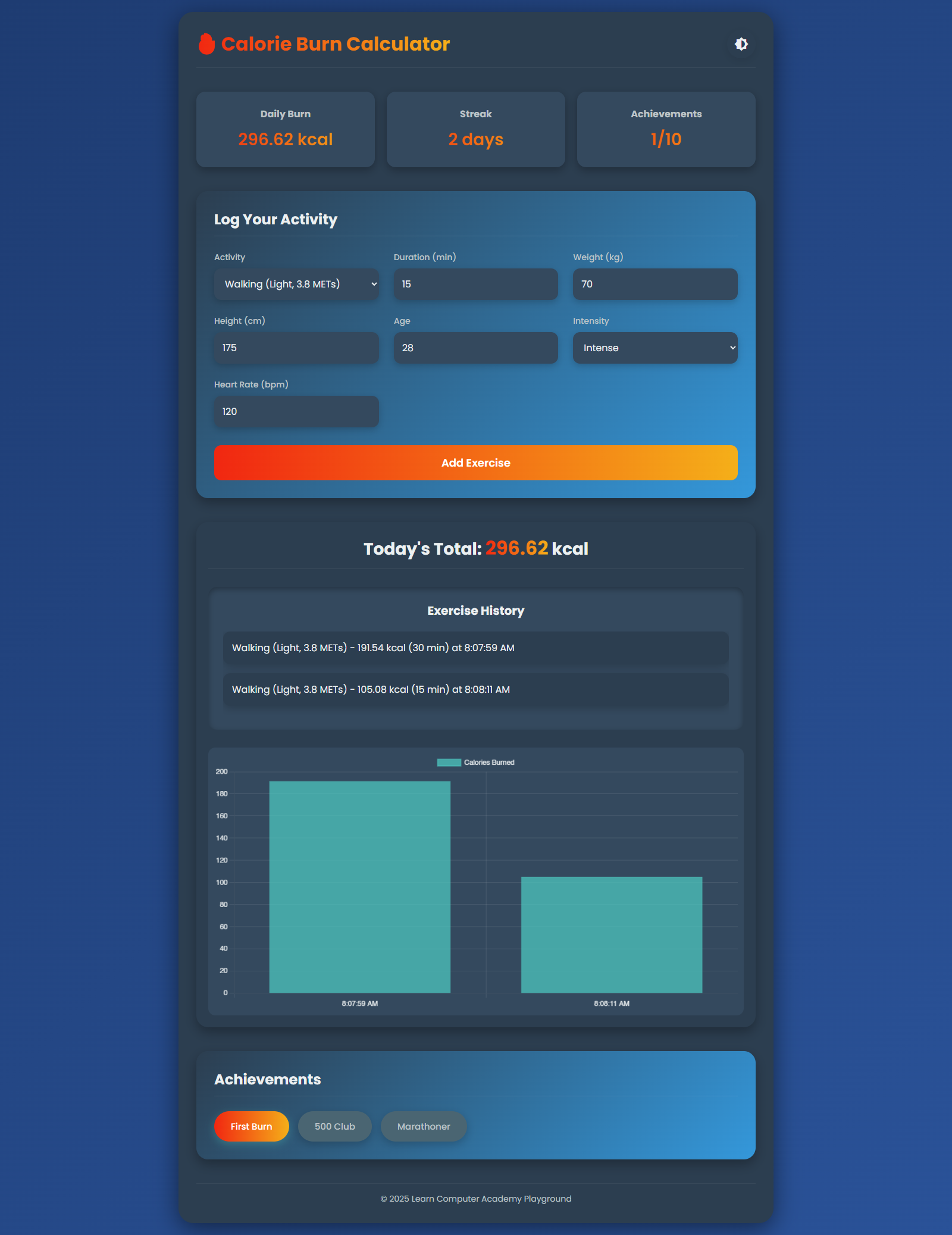
Hey fitness enthusiasts and fellow developers! 👋 Ever wondered how many calories you're actually burning during your workouts? Today, we're diving deep into creating a powerful, interactive Calorie Burn Calculator web app that not only calculates calories but also tracks your fitness journey.
Check out the live demo: Calorie Burn Calculator
The Motivation Behind the Project 💡
As developers, we love turning complex problems into elegant solutions. A calorie burn calculator isn't just about numbers – it's about empowering users to understand their fitness efforts. Our goal? Create an app that's:
Accurate
User-friendly
Visually appealing
Motivational
Core Features We'll Implement
1. Comprehensive Input Parameters 📊
Our calculator will consider multiple factors to provide precise calorie burn estimates:
Activity type
Duration
Weight
Height
Age
Intensity level
Optional heart rate tracking
2. Dynamic Calorie Calculation Algorithm 🧮
calculateBtn.addEventListener('click', () => {
    const activity = parseFloat(document.getElementById('activity').value);
    const duration = parseFloat(document.getElementById('duration').value);
    const weight = parseFloat(document.getElementById('weight').value);
    const height = parseFloat(document.getElementById('height').value);
    const age = parseFloat(document.getElementById('age').value);
    const intensity = parseFloat(document.getElementById('intensity').value);
    const heartRate = parseFloat(document.getElementById('heart-rate').value) || 0;
    const activityName = document.getElementById('activity').selectedOptions[0].text;

    if (!activity || !duration || !weight || !height || !age) {
        alert('Please fill in all required fields!');
        return;
    }


    let calories = (activity * weight * (duration / 60) * intensity);


    if (heartRate) {
        const vo2Max = 15 * (heartRate / (220 - age));
        calories = (calories * 0.7) + (vo2Max * weight * (duration / 60) * 0.3);
    }

    calories = calories.toFixed(2);


    const exercise = {
        name: activityName,
        calories: parseFloat(calories),
        duration,
        timestamp: new Date().toLocaleTimeString()
    };
    exerciseHistory.push(exercise);
    localStorage.setItem('exerciseHistory', JSON.stringify(exerciseHistory));


    dailyBurn += parseFloat(calories);
    streak++;
    localStorage.setItem('streak', streak);

    updateDashboard();
    updateHistory();
    updateChart();
    updateAchievements(calories);
});
3. User Experience Enhancements
Theme Toggle 🌓
Users can switch between light and dark modes for comfortable viewing in any environment.
Exercise History Tracking 📋
Keep a log of all exercises performed, with timestamps and calories burned.
Progress Visualization 📈
A dynamic chart that shows calorie burn progression over time.
Achievement System 🏆
Motivate users by creating achievement milestones like "First Burn", "500 Club", and "Marathoner".
Technical Implementation
HTML Structure
<!DOCTYPE html>
<html lang="en">
<head>
    <meta charset="UTF-8">
    <meta name="viewport" content="width=device-width, initial-scale=1.0">
    <title>Calorie Burn Calculator</title>
    <link rel="stylesheet" href="styles.css">
    <link href="https://fonts.googleapis.com/icon?family=Material+Icons" rel="stylesheet">
</head>
<body class="dark">
    <div class="container">
        <header>
            <h1>🔥 Calorie Burn Calculator</h1>
            <button id="theme-toggle" class="theme-btn">
                <span class="material-icons">brightness_6</span>
            </button>
        </header>

        <main>

            <section class="dashboard">
                <div class="card">
                    <h3>Daily Burn</h3>
                    <p id="daily-burn">0 kcal</p>
                </div>
                <div class="card">
                    <h3>Streak</h3>
                    <p id="streak">0 days</p>
                </div>
                <div class="card">
                    <h3>Achievements</h3>
                    <p id="achievements">0/10</p>
                </div>
            </section>


            <section class="calculator">
                <h2>Log Your Activity</h2>
                <div class="input-grid">
                    <div class="input-group">
                        <label for="activity">Activity</label>
                        <select id="activity">
                            <option value="3.8">Walking (Light, 3.8 METs)</option>
                            <option value="7.0">Running (Moderate, 7.0 METs)</option>
                            <option value="9.8">Cycling (Intense, 9.8 METs)</option>
                            <option value="6.0">Swimming (Moderate, 6.0 METs)</option>
                            <option value="4.5">Yoga (Light, 4.5 METs)</option>
                        </select>
                    </div>
                    <div class="input-group">
                        <label for="duration">Duration (min)</label>
                        <input type="number" id="duration" min="1" placeholder="e.g., 30">
                    </div>
                    <div class="input-group">
                        <label for="weight">Weight (kg)</label>
                        <input type="number" id="weight" min="1" placeholder="e.g., 70">
                    </div>
                    <div class="input-group">
                        <label for="height">Height (cm)</label>
                        <input type="number" id="height" min="1" placeholder="e.g., 170">
                    </div>
                    <div class="input-group">
                        <label for="age">Age</label>
                        <input type="number" id="age" min="1" placeholder="e.g., 25">
                    </div>
                    <div class="input-group">
                        <label for="intensity">Intensity</label>
                        <select id="intensity">
                            <option value="0.9">Light</option>
                            <option value="1.0">Moderate</option>
                            <option value="1.2">Intense</option>
                        </select>
                    </div>
                    <div class="input-group">
                        <label for="heart-rate">Heart Rate (bpm)</label>
                        <input type="number" id="heart-rate" min="1" placeholder="Optional">
                    </div>
                </div>
                <button id="calculate-btn">Add Exercise</button>
            </section>


            <section class="result" id="result">
                <h2>Today's Total: <span id="calories">0</span> kcal</h2>
                <div class="history" id="history">
                    <h3>Exercise History</h3>
                    <ul id="history-list"></ul>
                </div>
                <canvas id="progressChart" width="400" height="200"></canvas>
            </section>


            <section class="achievements">
                <h2>Achievements</h2>
                <div class="achievement-list" id="achievement-list"></div>
            </section>
        </main>

        <footer>
            <p id="footer-text"></p>
        </footer>
    </div>

    <script src="https://cdn.jsdelivr.net/npm/chart.js"></script>
    <script src="script.js"></script>
</body>
</html>
CSS Styling
* {
    margin: 0;
    padding: 0;
    box-sizing: border-box;
    font-family: 'Poppins', sans-serif;
}

body {
    background: linear-gradient(135deg, #e0eafc, #cfdef3);
    color: #2c3e50;
    transition: background 0.3s ease, color 0.3s ease;
    min-height: 100vh;
    padding: 20px;
}

body.dark {
    background: linear-gradient(135deg, #1e3c72, #2a5298);
    color: #ecf0f1;
}

.container {
    max-width: 1000px;
    margin: 0 auto;
    padding: 30px;
    background: #fff;
    border-radius: 25px;
    box-shadow: 0 10px 40px rgba(0, 0, 0, 0.15);
    transition: background 0.3s ease, box-shadow 0.3s ease;
}

body.dark .container {
    background: #2c3e50;
    box-shadow: 0 10px 40px rgba(0, 0, 0, 0.5);
}


header {
    display: flex;
    justify-content: space-between;
    align-items: center;
    margin-bottom: 40px;
    padding-bottom: 15px;
    border-bottom: 1px solid rgba(0, 0, 0, 0.05);
}

body.dark header {
    border-bottom: 1px solid rgba(255, 255, 255, 0.05);
}

h1 {
    font-size: 32px;
    font-weight: 700;
    background: linear-gradient(90deg, #f12711, #f5af19);
    -webkit-background-clip: text;
    background-clip: text;
    color: transparent;
}

.theme-btn {
    background: #fff;
    border: none;
    cursor: pointer;
    padding: 12px;
    border-radius: 50%;
    box-shadow: 0 4px 15px rgba(0, 0, 0, 0.1);
    transition: transform 0.3s ease, box-shadow 0.3s ease;
    display: flex;
    align-items: center;
    justify-content: center;
}

body.dark .theme-btn {
    background: #2c3e50;
    color: #ecf0f1;
}

.theme-btn:hover {
    transform: scale(1.1);
    box-shadow: 0 6px 20px rgba(0, 0, 0, 0.2);
}

.material-icons {
    font-size: 20px;
}


.dashboard {
    display: grid;
    grid-template-columns: repeat(auto-fit, minmax(200px, 1fr));
    gap: 20px;
    margin-bottom: 40px;
}

.card {
    padding: 25px 20px;
    background: #f8f9fa;
    border-radius: 15px;
    text-align: center;
    box-shadow: 0 5px 15px rgba(0, 0, 0, 0.05);
    transition: transform 0.3s ease, box-shadow 0.3s ease;
}

body.dark .card {
    background: #34495e;
    box-shadow: 0 5px 15px rgba(0, 0, 0, 0.3);
}

.card:hover {
    transform: translateY(-8px);
    box-shadow: 0 10px 25px rgba(0, 0, 0, 0.1);
}

body.dark .card:hover {
    box-shadow: 0 10px 25px rgba(0, 0, 0, 0.4);
}

.card h3 {
    font-size: 16px;
    margin-bottom: 10px;
    color: #7f8c8d;
}

body.dark .card h3 {
    color: #bdc3c7;
}

.card p {
    font-size: 28px;
    font-weight: 600;
    background: linear-gradient(90deg, #f12711, #f5af19);
    -webkit-background-clip: text;
    background-clip: text;
    color: transparent;
}


.calculator {
    padding: 30px;
    background: linear-gradient(135deg, #f5f7fa, #c3cfe2);
    border-radius: 20px;
    margin-bottom: 40px;
    box-shadow: 0 8px 20px rgba(0, 0, 0, 0.05);
}

body.dark .calculator {
    background: linear-gradient(135deg, #2c3e50, #3498db);
    box-shadow: 0 8px 20px rgba(0, 0, 0, 0.3);
}

.calculator h2 {
    font-size: 24px;
    margin-bottom: 25px;
    color: #2c3e50;
    padding-bottom: 10px;
    border-bottom: 1px solid rgba(0, 0, 0, 0.1);
}

body.dark .calculator h2 {
    color: #ecf0f1;
    border-bottom: 1px solid rgba(255, 255, 255, 0.1);
}

.input-grid {
    display: grid;
    grid-template-columns: repeat(auto-fit, minmax(220px, 1fr));
    gap: 25px;
}

.input-group {
    display: flex;
    flex-direction: column;
}

label {
    font-size: 14px;
    margin-bottom: 8px;
    font-weight: 500;
    color: #5d6d7e;
}

body.dark label {
    color: #bdc3c7;
}

input, select {
    padding: 14px;
    font-size: 16px;
    border: none;
    border-radius: 12px;
    background: #fff;
    box-shadow: 0 4px 12px rgba(0, 0, 0, 0.05);
    transition: all 0.3s ease;
}

body.dark input, body.dark select {
    background: #34495e;
    color: #ecf0f1;
    box-shadow: 0 4px 12px rgba(0, 0, 0, 0.2);
}

input:focus, select:focus {
    outline: none;
    box-shadow: 0 0 0 3px rgba(78, 205, 196, 0.3);
    transform: translateY(-2px);
}

body.dark input:focus, body.dark select:focus {
    box-shadow: 0 0 0 3px rgba(78, 205, 196, 0.5);
}

input::placeholder {
    color: #bdc3c7;
}

body.dark input::placeholder {
    color: #7f8c8d;
}

button#calculate-btn {
    width: 100%;
    padding: 16px;
    font-size: 18px;
    font-weight: 600;
    background: linear-gradient(90deg, #f12711, #f5af19);
    color: #fff;
    border: none;
    border-radius: 12px;
    cursor: pointer;
    margin-top: 30px;
    transition: transform 0.3s ease, box-shadow 0.3s ease;
}

button#calculate-btn:hover {
    transform: translateY(-3px);
    box-shadow: 0 8px 25px rgba(78, 205, 196, 0.4);
}

button#calculate-btn:active {
    transform: translateY(1px);
}


.result {
    text-align: center;
    margin-bottom: 40px;
    padding: 20px;
    background: #fff;
    border-radius: 20px;
    box-shadow: 0 8px 20px rgba(0, 0, 0, 0.05);
}

body.dark .result {
    background: #2c3e50;
    box-shadow: 0 8px 20px rgba(0, 0, 0, 0.3);
}

.result h2 {
    font-size: 28px;
    margin-bottom: 25px;
    padding-bottom: 10px;
    border-bottom: 1px solid rgba(0, 0, 0, 0.05);
}

body.dark .result h2 {
    border-bottom: 1px solid rgba(255, 255, 255, 0.05);
}

.result span {
    background: linear-gradient(90deg, #f12711, #f5af19);
    -webkit-background-clip: text;
    background-clip: text;
    color: transparent;
    font-weight: 700;
    font-size: 32px;
}

.history {
    margin: 30px 0;
    padding: 25px;
    background: #f5f7fa;
    border-radius: 15px;
    box-shadow: inset 0 4px 10px rgba(0, 0, 0, 0.05);
}

body.dark .history {
    background: #34495e;
    box-shadow: inset 0 4px 10px rgba(0, 0, 0, 0.3);
}

.history h3 {
    font-size: 20px;
    margin-bottom: 20px;
    color: #2c3e50;
}

body.dark .history h3 {
    color: #ecf0f1;
}

#history-list {
    list-style: none;
    text-align: left;
    max-height: 250px;
    overflow-y: auto;
}

#history-list li {
    padding: 15px;
    background: #fff;
    border-radius: 12px;
    margin-bottom: 15px;
    box-shadow: 0 4px 15px rgba(0, 0, 0, 0.05);
    transition: transform 0.2s ease;
}

body.dark #history-list li {
    background: #2c3e50;
    box-shadow: 0 4px 15px rgba(0, 0, 0, 0.2);
}

#history-list li:hover {
    transform: translateY(-3px);
}

#progressChart {
    margin-top: 30px;
    max-width: 100%;
    height: auto;
    border-radius: 12px;
    background: #f5f7fa;
    padding: 10px;
}

body.dark #progressChart {
    background: #34495e;
}


.achievements {
    padding: 30px;
    background: linear-gradient(135deg, #f5f7fa, #c3cfe2);
    border-radius: 20px;
    box-shadow: 0 8px 20px rgba(0, 0, 0, 0.05);
}

body.dark .achievements {
    background: linear-gradient(135deg, #2c3e50, #3498db);
    box-shadow: 0 8px 20px rgba(0, 0, 0, 0.3);
}

.achievements h2 {
    font-size: 24px;
    margin-bottom: 25px;
    color: #2c3e50;
    padding-bottom: 10px;
    border-bottom: 1px solid rgba(0, 0, 0, 0.1);
}

body.dark .achievements h2 {
    color: #ecf0f1;
    border-bottom: 1px solid rgba(255, 255, 255, 0.1);
}

.achievement-list {
    display: flex;
    flex-wrap: wrap;
    gap: 15px;
}

.achievement {
    padding: 14px 28px;
    background: linear-gradient(90deg, #f12711, #f5af19);
    color: #fff;
    border-radius: 30px;
    font-size: 15px;
    font-weight: 500;
    transition: transform 0.3s ease, box-shadow 0.3s ease;
    box-shadow: 0 5px 15px rgba(78, 205, 196, 0.3);
}

.achievement.locked {
    background: #e0e0e0;
    color: #95a5a6;
    box-shadow: 0 5px 15px rgba(0, 0, 0, 0.05);
}

body.dark .achievement.locked {
    background: #4a6572;
    color: #bdc3c7;
    box-shadow: 0 5px 15px rgba(0, 0, 0, 0.2);
}

.achievement:hover {
    transform: translateY(-5px) scale(1.03);
    box-shadow: 0 8px 20px rgba(78, 205, 196, 0.4);
}

.achievement.locked:hover {
    transform: translateY(-3px);
    box-shadow: 0 8px 20px rgba(0, 0, 0, 0.1);
}

body.dark .achievement.locked:hover {
    box-shadow: 0 8px 20px rgba(0, 0, 0, 0.3);
}


footer {
    text-align: center;
    font-size: 14px;
    color: #7f8c8d;
    margin-top: 40px;
    padding-top: 15px;
    border-top: 1px solid rgba(0, 0, 0, 0.05);
}

body.dark footer {
    color: #bdc3c7;
    border-top: 1px solid rgba(255, 255, 255, 0.05);
}


@media (max-width: 768px) {
    .container {
        padding: 20px;
    }

    .dashboard {
        grid-template-columns: 1fr;
    }

    .calculator, .achievements {
        padding: 25px 20px;
    }

    h1 {
        font-size: 26px;
    }

    .result h2 {
        font-size: 24px;
    }

    .card p {
        font-size: 24px;
    }
}

@media (max-width: 480px) {
    .input-grid {
        grid-template-columns: 1fr;
        gap: 20px;
    }

    .achievement {
        padding: 12px 20px;
        font-size: 14px;
    }
}
JavaScript Functionality
const themeToggle = document.getElementById('theme-toggle');
themeToggle.addEventListener('click', () => {
    document.body.classList.toggle('dark');
    localStorage.setItem('theme', document.body.classList.contains('dark') ? 'dark' : 'light');
    updateChartColors();
});


if (localStorage.getItem('theme') === 'dark') {
    document.body.classList.add('dark');
}


document.getElementById('footer-text').textContent = `© ${new Date().getFullYear()} Learn Computer Academy Playground`;


let dailyBurn = 0;
let streak = parseInt(localStorage.getItem('streak')) || 0;
let achievementsEarned = parseInt(localStorage.getItem('achievements')) || 0;
const totalAchievements = 10;
let exerciseHistory = JSON.parse(localStorage.getItem('exerciseHistory')) || [];

function updateDashboard() {
    document.getElementById('daily-burn').textContent = `${dailyBurn.toFixed(2)} kcal`;
    document.getElementById('streak').textContent = `${streak} days`;
    document.getElementById('achievements').textContent = `${achievementsEarned}/${totalAchievements}`;
    document.getElementById('calories').textContent = dailyBurn.toFixed(2);
}


const calculateBtn = document.getElementById('calculate-btn');
const historyList = document.getElementById('history-list');

calculateBtn.addEventListener('click', () => {
    const activity = parseFloat(document.getElementById('activity').value);
    const duration = parseFloat(document.getElementById('duration').value);
    const weight = parseFloat(document.getElementById('weight').value);
    const height = parseFloat(document.getElementById('height').value);
    const age = parseFloat(document.getElementById('age').value);
    const intensity = parseFloat(document.getElementById('intensity').value);
    const heartRate = parseFloat(document.getElementById('heart-rate').value) || 0;
    const activityName = document.getElementById('activity').selectedOptions[0].text;

    if (!activity || !duration || !weight || !height || !age) {
        alert('Please fill in all required fields!');
        return;
    }


    let calories = (activity * weight * (duration / 60) * intensity);


    if (heartRate) {
        const vo2Max = 15 * (heartRate / (220 - age));
        calories = (calories * 0.7) + (vo2Max * weight * (duration / 60) * 0.3);
    }

    calories = calories.toFixed(2);


    const exercise = {
        name: activityName,
        calories: parseFloat(calories),
        duration,
        timestamp: new Date().toLocaleTimeString()
    };
    exerciseHistory.push(exercise);
    localStorage.setItem('exerciseHistory', JSON.stringify(exerciseHistory));


    dailyBurn += parseFloat(calories);
    streak++;
    localStorage.setItem('streak', streak);

    updateDashboard();
    updateHistory();
    updateChart();
    updateAchievements(calories);
});


function updateHistory() {
    historyList.innerHTML = exerciseHistory.map(ex => `
        <li>${ex.name} - ${ex.calories} kcal (${ex.duration} min) at ${ex.timestamp}</li>
    `).join('');
}


const ctx = document.getElementById('progressChart').getContext('2d');
let chart = new Chart(ctx, {
    type: 'bar',
    data: {
        labels: [],
        datasets: [{
            label: 'Calories Burned',
            data: [],
            backgroundColor: 'rgba(78, 205, 196, 0.7)',
            borderColor: '#4ecdc4',
            borderWidth: 1
        }]
    },
    options: {
        scales: {
            y: {
                beginAtZero: true,
                ticks: {
                    color: '#2c3e50'
                },
                grid: {
                    color: 'rgba(0, 0, 0, 0.1)'
                }
            },
            x: {
                ticks: {
                    color: '#2c3e50'
                },
                grid: {
                    color: 'rgba(0, 0, 0, 0.1)'
                }
            }
        },
        plugins: {
            legend: {
                labels: {
                    color: '#2c3e50'
                }
            }
        }
    }
});


function updateChartColors() {
    const isDark = document.body.classList.contains('dark');
    chart.options.scales.y.ticks.color = isDark ? '#ecf0f1' : '#2c3e50';
    chart.options.scales.x.ticks.color = isDark ? '#ecf0f1' : '#2c3e50';
    chart.options.scales.y.grid.color = isDark ? 'rgba(255, 255, 255, 0.1)' : 'rgba(0, 0, 0, 0.1)';
    chart.options.scales.x.grid.color = isDark ? 'rgba(255, 255, 255, 0.1)' : 'rgba(0, 0, 0, 0.1)';
    chart.options.plugins.legend.labels.color = isDark ? '#ecf0f1' : '#2c3e50';
    chart.update();
}

function updateChart() {
    chart.data.labels = exerciseHistory.map(ex => ex.timestamp);
    chart.data.datasets[0].data = exerciseHistory.map(ex => ex.calories);
    updateChartColors();
    chart.update();
}


const achievementList = document.getElementById('achievement-list');
const achievements = [
    { name: 'First Burn', threshold: 100, earned: false },
    { name: '500 Club', threshold: 500, earned: false },
    { name: 'Marathoner', threshold: 1000, earned: false }
];

function updateAchievements(calories) {
    achievements.forEach((ach, index) => {
        if (!ach.earned && dailyBurn >= ach.threshold) {
            ach.earned = true;
            achievementsEarned++;
            localStorage.setItem('achievements', achievementsEarned);
        }
    });

    achievementList.innerHTML = achievements.map(ach => `
        <span class="achievement ${ach.earned ? '' : 'locked'}">${ach.name}</span>
    `).join('');
    updateDashboard();
}


updateDashboard();
updateHistory();
updateChart();
updateAchievements(0);
updateChartColors();
Theme Toggling
const themeToggle = document.getElementById('theme-toggle');
themeToggle.addEventListener('click', () => {
    document.body.classList.toggle('dark');
    localStorage.setItem('theme', document.body.classList.contains('dark') ? 'dark' : 'light');
    updateChartColors();
});
Calorie Calculation Logic
let calories = (activity * weight * (duration / 60) * intensity);


    if (heartRate) {
        const vo2Max = 15 * (heartRate / (220 - age));
        calories = (calories * 0.7) + (vo2Max * weight * (duration / 60) * 0.3);
    }

    calories = calories.toFixed(2);
Local Storage Management
const exercise = {
        name: activityName,
        calories: parseFloat(calories),
        duration,
        timestamp: new Date().toLocaleTimeString()
    };
    exerciseHistory.push(exercise);
    localStorage.setItem('exerciseHistory', JSON.stringify(exerciseHistory));
Challenges and Solutions 🛠️
Challenge 1: Accurate Calorie Calculation
Solution: Incorporate MET (Metabolic Equivalent of Task) values and additional heart rate calculation for precision.
Challenge 2: Responsive Design
Solution: Use CSS Grid and Flexbox for flexible layouts across devices.
Challenge 3: User Engagement
Solution: Implement an achievement system and persistent tracking.
Performance Optimization Techniques 🚀
Minimal DOM manipulation
Efficient local storage usage
Lightweight charting with Chart.js
Responsive design with minimal media queries
Future Improvements 🌟
Add more activity types
Implement user accounts
Create personalized fitness recommendations
Add nutrition tracking
Conclusion
Building this Calorie Burn Calculator was an exciting journey of combining fitness science, web development, and user experience design. Whether you're a fitness tracker, a health enthusiast, or a developer looking to create meaningful applications, this project demonstrates how technology can inspire and support personal health goals.
Get Started
Check out the live demo: Calorie Burn Calculator
Happy coding and happy fitness tracking! 💪🏼👨💻
Developed with ❤️ by Learn Computer Academy


