

Spin to Decide: Creating a Weighted Random Decision Maker Web App 🎲🤔
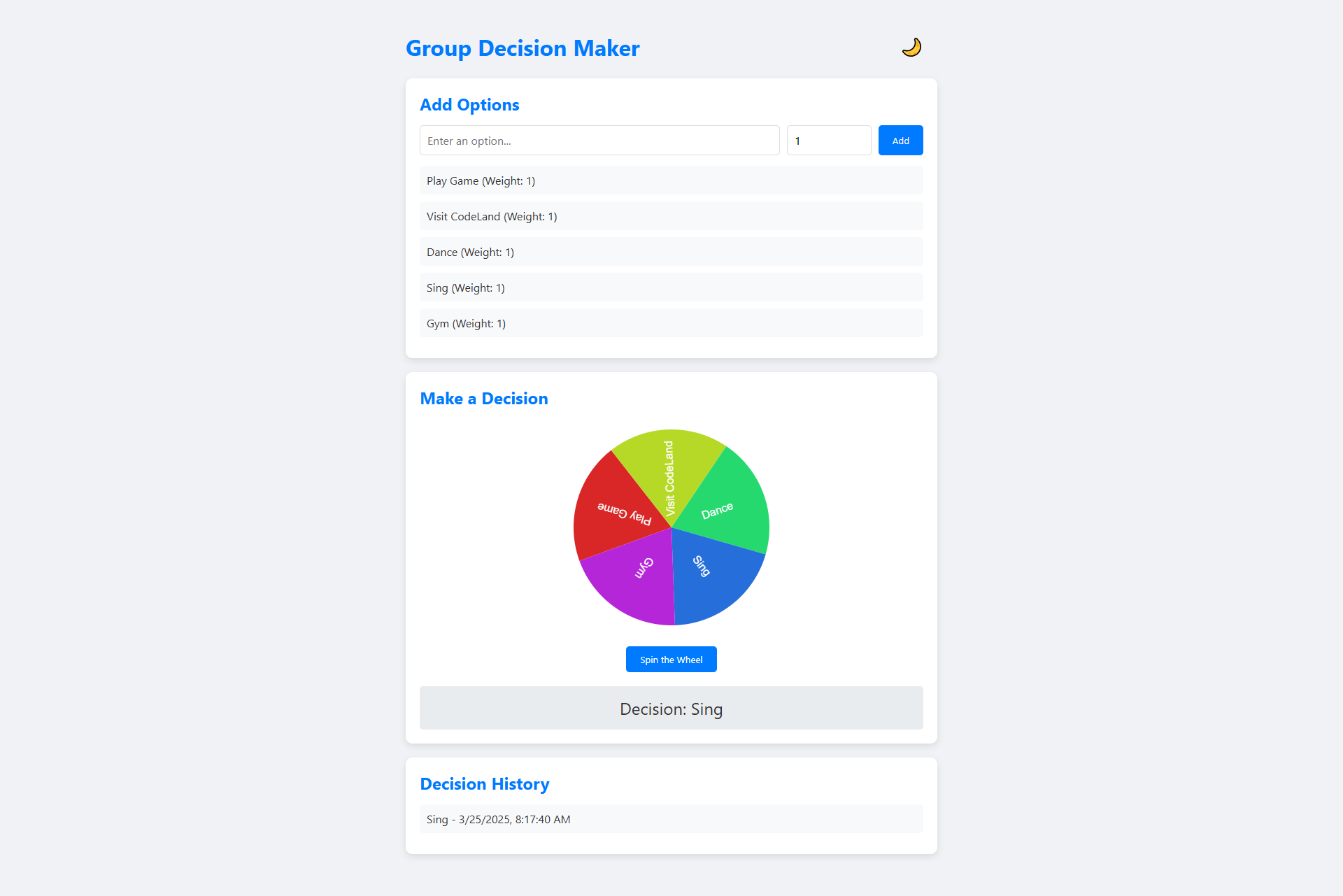
Making group decisions can be challenging. Whether you're planning a team lunch, choosing a movie for movie night, or settling a friendly debate, sometimes you need a fair and fun way to make a choice. That's where our Group Decision Maker app comes in! 🌟
Inspiration Behind the App 💡
We've all been there - stuck in endless discussions with no clear resolution. Traditional decision-making methods can be time-consuming and sometimes lead to disagreements. What if we could add a bit of excitement and fairness to the process? Enter the Group Decision Maker!
Check out the live link here - https://playground.learncomputer.in/group-decision-maker/
Key Features 🚀
Our web app offers some unique capabilities:
Add multiple options with custom weights
Spin a colorful wheel to make the decision
Track decision history
Dark/light theme toggle
Responsive design for any device
How It Works 🎡
Adding Options
The core of our app is super simple. Users can:
Enter an option (like "Pizza" or "Hiking")
Assign a weight between 1-10 (more weight = higher chance of selection)
Click "Add" to include the option in the decision wheel
The Weighted Random Selection 🎯
Instead of a purely random selection, our app uses a weighted random algorithm. This means:
Options with higher weights have a proportionally higher chance of being selected
It's not completely random, but it's not completely biased either
Perfect for scenarios where some options are more preferable but you still want an element of chance
Spinning the Wheel 🌈
When you click "Spin the Wheel":
The wheel animates with a satisfying spin
Each option is represented by a different color
The wheel stops on a winner based on the weighted probabilities
Decision History 📜
Every decision is saved in the history section, so you can look back on past choices and remember those memorable moments of chance!
Technical Deep Dive 💻
HTML Structure
<!DOCTYPE html>
<html lang="en">
<head>
    <meta charset="UTF-8">
    <meta name="viewport" content="width=device-width, initial-scale=1.0">
    <title>Group Decision Maker</title>
    <link rel="stylesheet" href="styles.css">
</head>
<body>
    <div class="container">
        <header>
            <h1>Group Decision Maker</h1>
            <button id="theme-toggle" aria-label="Toggle Theme">🌙</button>
        </header>

        <section class="input-section">
            <h2>Add Options</h2>
            <div class="option-input">
                <input type="text" id="option-text" placeholder="Enter an option..." aria-label="Option" style="flex:5">
                <input type="number" id="option-weight" min="1" max="10" value="1" placeholder="Weight (1-10)" aria-label="Weight">
                <button id="add-option">Add</button>
            </div>
            <ul id="option-list"></ul>
        </section>

        <section class="decision-section">
            <h2>Make a Decision</h2>
            <div class="wheel-container">
                <canvas id="wheel" width="300" height="300"></canvas>
                <button id="spin-wheel">Spin the Wheel</button>
            </div>
            <div id="result" class="result hidden"></div>
        </section>

        <section class="history-section">
            <h2>Decision History</h2>
            <ul id="history-list"></ul>
        </section>
    </div>
    <script src="script.js"></script>
</body>
</html>
CSS Styling
* {
    margin: 0;
    padding: 0;
    box-sizing: border-box;
    font-family: 'Segoe UI', Tahoma, Geneva, Verdana, sans-serif;
}

body {
    background: #f0f2f5;
    color: #333;
    transition: all 0.3s ease;
}

body.dark {
    background: #1a1a1a;
    color: #f0f2f5;
}

.container {
    max-width: 800px;
    margin: 20px auto;
    padding: 20px;
}

header {
    display: flex;
    justify-content: space-between;
    align-items: center;
    margin-bottom: 20px;
}

header h1 {
    font-size: 2rem;
    color: #007bff;
}

#theme-toggle {
    background: none;
    border: none;
    font-size: 1.5rem;
    cursor: pointer;
}

section {
    background: white;
    padding: 20px;
    border-radius: 10px;
    margin-bottom: 20px;
    box-shadow: 0 4px 10px rgba(0, 0, 0, 0.1);
    transition: all 0.3s ease;
}

body.dark section {
    background: #2c2c2c;
    box-shadow: 0 4px 10px rgba(0, 0, 0, 0.5);
}

h2 {
    font-size: 1.5rem;
    margin-bottom: 15px;
    color: #007bff;
}

.option-input {
    display: flex;
    gap: 10px;
    margin-bottom: 15px;
}

input[type="text"],
input[type="number"] {
    padding: 10px;
    border: 1px solid #ddd;
    border-radius: 5px;
    font-size: 1rem;
    flex: 1;
}

body.dark input[type="text"],
body.dark input[type="number"] {
    background: #333;
    color: #fff;
    border-color: #555;
}

button {
    padding: 10px 20px;
    background: #007bff;
    color: white;
    border: none;
    border-radius: 5px;
    cursor: pointer;
    transition: background 0.3s ease;
}

button:hover {
    background: #0056b3;
}

#option-list,
#history-list {
    list-style: none;
}

#option-list li,
#history-list li {
    padding: 10px;
    background: #f8f9fa;
    margin-bottom: 10px;
    border-radius: 5px;
    display: flex;
    justify-content: space-between;
    align-items: center;
}

body.dark #option-list li,
body.dark #history-list li {
    background: #3a3a3a;
}

.wheel-container {
    text-align: center;
}

#wheel {
    margin: 20px auto;
    display: block;
}

.result {
    text-align: center;
    font-size: 1.5rem;
    margin-top: 20px;
    padding: 15px;
    background: #e9ecef;
    border-radius: 5px;
}

body.dark .result {
    background: #444;
}

.hidden {
    display: none;
}

@keyframes spin {
    0% { transform: rotate(0deg); }
    100% { transform: rotate(360deg); }
}
JavaScript Magic ✨
const options = [];
const history = [];
const canvas = document.getElementById('wheel');
const ctx = canvas.getContext('2d');
let spinning = false;

document.getElementById('add-option').addEventListener('click', addOption);
document.getElementById('spin-wheel').addEventListener('click', spinWheel);
document.getElementById('theme-toggle').addEventListener('click', toggleTheme);

function addOption() {
    const text = document.getElementById('option-text').value.trim();
    const weight = parseInt(document.getElementById('option-weight').value) || 1;

    if (text) {
        options.push({ text, weight });
        document.getElementById('option-text').value = '';
        document.getElementById('option-weight').value = 1;
        renderOptions();
    }
}

function renderOptions() {
    const optionList = document.getElementById('option-list');
    optionList.innerHTML = '';
    options.forEach((opt, index) => {
        const li = document.createElement('li');
        li.textContent = `${opt.text} (Weight: ${opt.weight})`;
        optionList.appendChild(li);
    });
    drawWheel();
}

function drawWheel() {
    const totalWeight = options.reduce((sum, opt) => sum + opt.weight, 0);
    let startAngle = 0;

    ctx.clearRect(0, 0, canvas.width, canvas.height);
    options.forEach((opt, index) => {
        const sliceAngle = (opt.weight / totalWeight) * 2 * Math.PI;
        ctx.beginPath();
        ctx.moveTo(150, 150);
        ctx.arc(150, 150, 140, startAngle, startAngle + sliceAngle);
        ctx.fillStyle = `hsl(${index * 360 / options.length}, 70%, 50%)`;
        ctx.fill();
        ctx.closePath();

        // Add text
        ctx.save();
        ctx.translate(150, 150);
        ctx.rotate(startAngle + sliceAngle / 2);
        ctx.fillStyle = 'white';
        ctx.font = '16px Arial';
        ctx.textAlign = 'center';
        ctx.fillText(opt.text, 70, 5);
        ctx.restore();

        startAngle += sliceAngle;
    });
}

function spinWheel() {
    if (options.length === 0 || spinning) return;
    spinning = true;

    const totalWeight = options.reduce((sum, opt) => sum + opt.weight, 0);
    const random = Math.random() * totalWeight;
    let cumulativeWeight = 0;
    let winner = null;

    for (const opt of options) {
        cumulativeWeight += opt.weight;
        if (random <= cumulativeWeight) {
            winner = opt.text;
            break;
        }
    }

    const spinAngle = 360 * 5 + Math.random() * 360; // 5 full spins + random
    let currentAngle = 0;

    const spin = () => {
        currentAngle += 20;
        ctx.clearRect(0, 0, canvas.width, canvas.height);
        ctx.save();
        ctx.translate(150, 150);
        ctx.rotate((currentAngle * Math.PI) / 180);
        ctx.translate(-150, -150);
        drawWheel();
        ctx.restore();

        if (currentAngle < spinAngle) {
            requestAnimationFrame(spin);
        } else {
            spinning = false;
            showResult(winner);
            addToHistory(winner);
        }
    };

    spin();
}

function showResult(winner) {
    const result = document.getElementById('result');
    result.textContent = `Decision: ${winner}`;
    result.classList.remove('hidden');
}

function addToHistory(winner) {
    history.push({ decision: winner, date: new Date().toLocaleString() });
    renderHistory();
}

function renderHistory() {
    const historyList = document.getElementById('history-list');
    historyList.innerHTML = '';
    history.forEach(item => {
        const li = document.createElement('li');
        li.textContent = `${item.decision} - ${item.date}`;
        historyList.appendChild(li);
    });
}

function toggleTheme() {
    document.body.classList.toggle('dark');
    document.getElementById('theme-toggle').textContent =
        document.body.classList.contains('dark') ? '☀️' : '🌙';
}
The heart of our app lies in the JavaScript. Key functions include:
addOption(): Captures user input and creates decision optionsdrawWheel(): Renders the colorful decision wheelspinWheel(): Implements the weighted random selection algorithmtoggleTheme(): Switches between light and dark modes
Weighted Random Algorithm 🧮
The selection algorithm is beautifully simple:
Calculate total weight of all options
Generate a random number scaled to total weight
Iterate through options, accumulating weights
Select the option where the random number falls
Practical Use Cases 🌍
Team Lunch Selection 🍽️
Weekend Activity Picker 🏞️
Game Night Decision Maker 🎮
Study Group Project Assignment 📚
Friend Group Conflict Resolution 🤝
Accessibility and Design 🌈
We've ensured the app is:
Responsive across devices
Accessible with proper aria labels
Visually appealing with a clean, modern design
Supports dark mode for different lighting conditions
Future Improvements 🚀
Potential enhancements could include:
Saving decisions to local storage
Sharing decision links
More customization options
Collaborative decision-making features
Conclusion 🎉
The Group Decision Maker is more than just an app - it's a fun, fair way to make choices. By combining randomness with weighted preferences, we've created a tool that can turn decision-making from a chore into an exciting moment of anticipation!
Happy deciding! 🎲✨


